Bounties
A bounty chip is a token a player buys at the start of, or during, a tournament. When the holder is knocked out, the bounty transfers to the player who eliminated them. Bounties add a “head-hunting” layer on top of the regular prize pool.
Bounties and the prize pool
Section titled “Bounties and the prize pool”For example, with a $20 buy-in and a $5 bounty chip cost:
- A player who buys in and takes a bounty chip pays $25 total ($20 to the prize pool, $5 to the bounty pool).
- A player who buys in without a bounty chip pays $20 (all of it to the prize pool).
Enabling bounties
Section titled “Enabling bounties”Bounties require pro player management. In the tournament’s Settings screen, set Player management to pro at the top — the bounty settings don’t appear in basic mode.
Then turn on the Bounties switch. Two settings appear:
Bounty chip cost
Section titled “Bounty chip cost”The price a player pays for a single bounty chip. This is charged in addition to the buy-in cost — it is not deducted from it. Enter the dollar amount your club uses for its head-hunter pool.
Need chip to win chip
Section titled “Need chip to win chip”Controls who is eligible to win a bounty when they knock out a bounty-holder.
- On — Only eliminators who already hold a bounty chip can win one. If a player without a bounty chip eliminates a bounty-holder, the bounty stays with the eliminated player — it isn’t lost, and it still counts toward their Total winnings.
- Off — Any eliminator can win a bounty, whether they hold one themselves or not.
Buying a bounty chip
Section titled “Buying a bounty chip”Players can pick up a bounty chip two ways:
- At buy-in or reentry — In the buy-in dialog, toggle Buy bounty chip before confirming. The player is charged the buy-in plus the bounty chip cost in a single transaction (logged as two separate entries).
- Later, during the tournament — On the Players screen, tap an active player who doesn’t already hold a bounty chip, then choose Buy bounty chip. The player is charged the bounty chip cost only.
A player can hold at most one bounty chip at a time, and that chip is always worth the bounty chip cost. It does not grow as they collect bounties — see below.
Knockouts and bounty transfers
Section titled “Knockouts and bounty transfers”When you record a knockout on the Players screen, you select the eliminator (or eliminators, if multiple players contributed to the knockout). If the eliminated player held a bounty chip:
- The bounty value goes to the eliminator(s).
- If there are multiple eliminators, the value is split equally among them.
- If Need chip to win chip is on, only eliminators who already hold a bounty are eligible to share in the transfer. If none of them qualify, the bounty stays with the eliminated player.
Where bounty data appears
Section titled “Where bounty data appears”Bounty activity surfaces in several places:
- Players screen — Each player tile shows the player’s current bounty chip value and total bounty winnings.
- Tournament log — Bounty chip purchases are recorded as separate log entries with player name and cost. They can be undone and redone like any player action.
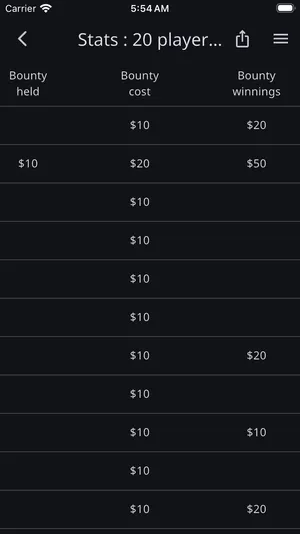
- Stats & reporting — Four dedicated columns:
- Bounty held — Current bounty chip value the player is carrying.
- Bounty cost — Total the player has paid for bounty chips (separate from Chips cost, which is the prize-pool side).
- Bounty winnings — Total bounty value the player has won by knocking out other bounty-holders.
- Total winnings — Payout plus bounty money in one reporting total (the pools themselves stay separate).
- Payouts timer screen — A Bounties widget appears beside the payouts, listing the top 10 bounty winners and their winnings. It’s also available from the timer’s widget gallery, so you can place it on any screen.