Poker Club HQ Help
Poker Club HQ runs your poker club or league end to end: blind structures, chip sets, registration, seating, and table balancing.
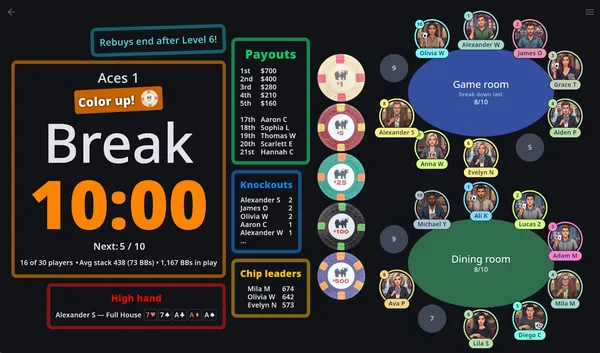
A customizable timer, QR sharing, and cloud sync keep every screen in step. Track buy-ins, rebuys, bounties, and chops, seat players by drag-and-drop with assisted balancing, and review it all with full undo/redo and exportable stats.
Recently added, all about your chips: the app now suggests a starting stack for each player and tells you whether your case holds enough, builds blinds and antes around the chips you own so the small denominations retire on schedule, calls out which chips to color up at each break (or at every level, if that’s how you play), and drops them off the timer once the blinds have passed them. Before that: players connected to a shared tournament can update their own profile and report their chips and hand from their phone, a Chip leaders widget shows who’s out in front, and your players can have photos that show at their seats on the Tables screen.
Poker Club HQ is available on iPhones and iPads, Android phones and tablets, and on the web. It’s free to use, with paid plans that lift the player limit and add club features — see Purchases & plans.
Get the app
Section titled “Get the app”- Web: https://pokerclubhq.com
- Android: https://play.google.com/store/apps/details?id=com.robinapps.pokertimer
- iPhone and iPad: https://apps.apple.com/app/id458921369
Have a say
Section titled “Have a say”Found a bug? Have a feature idea? We’d love to hear from you. Join the conversation in GitHub Discussions, report issues, upvote the features that matter most to you, and follow our roadmap to see what’s coming next. Prefer email? Write to support@pokerclubhq.com. See the Feedback & roadmap page for details.
Feature highlights
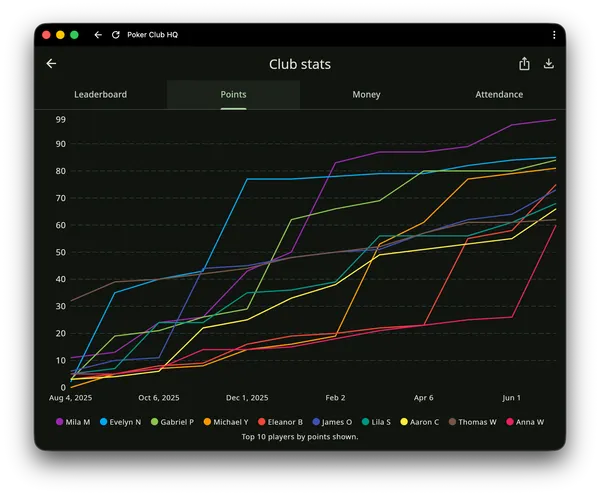
Section titled “Feature highlights”Club stats — season leaderboards, points races, money, and attendance
Section titled “Club stats — season leaderboards, points races, money, and attendance”Compile stats across every completed tournament in a folder into a league-style season dashboard. See Club stats.
Player photos — see every face at the table
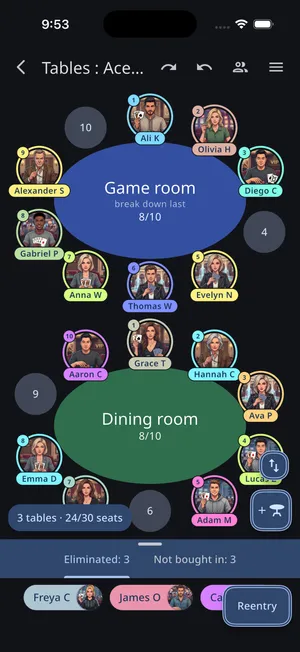
Section titled “Player photos — see every face at the table”Add photos to your players and the tables screen shows them right at their seats. See Player photos.
Players keep their own profiles current
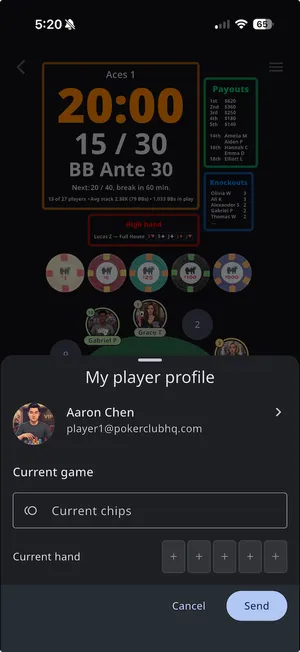
Section titled “Players keep their own profiles current”Connect players to a shared tournament and they can update their own photo and details — and report their chips and hand — right from their phone. See Player profile updates.
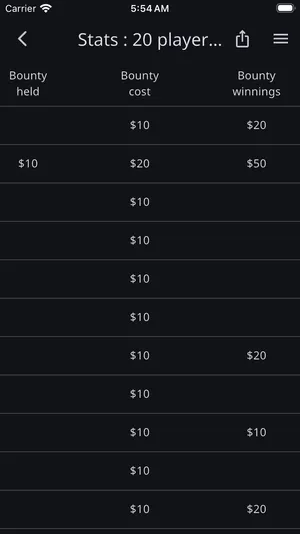
Bounty chip tracking
Section titled “Bounty chip tracking”Track who bought a bounty chip, who holds whose bounty, and what each player has won — all kept separate from the prize pool. See Bounties.
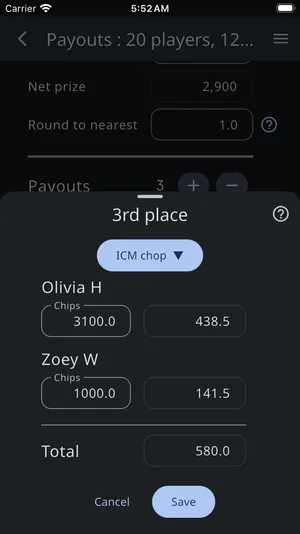
Chopping — ICM chop, chip chop, even chop, and custom chop
Section titled “Chopping — ICM chop, chip chop, even chop, and custom chop”Settle a deal at the final table four different ways, with payouts recalculated for you. See Payouts & chops.
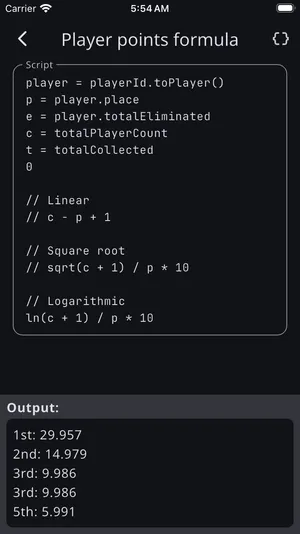
Comprehensive stats collection including custom player point calculation
Section titled “Comprehensive stats collection including custom player point calculation”Every finish, payout, and knockout is recorded, with a points formula you can write yourself. See Stats & reporting.
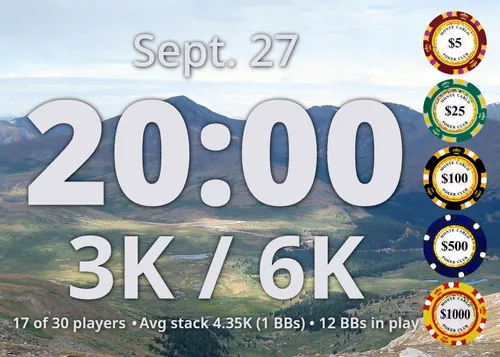
Upload your custom chip images
Section titled “Upload your custom chip images”Photograph your own chips and use them throughout the app. See Chip sets.
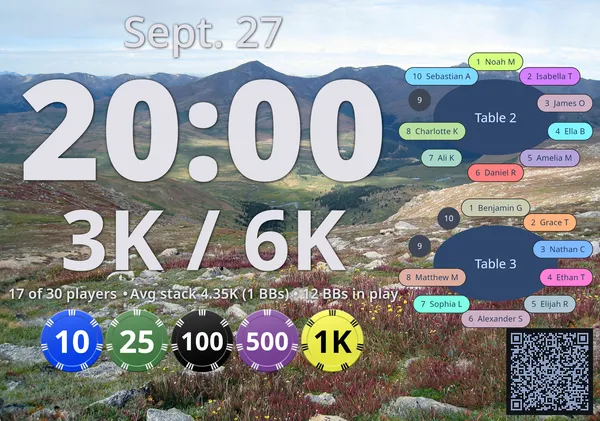
QR Code for real-time timer sharing
Section titled “QR Code for real-time timer sharing”A QR Code can be added to your timer screen, letting anyone connect to a live view of the timer that they can’t edit. See QR code sharing.
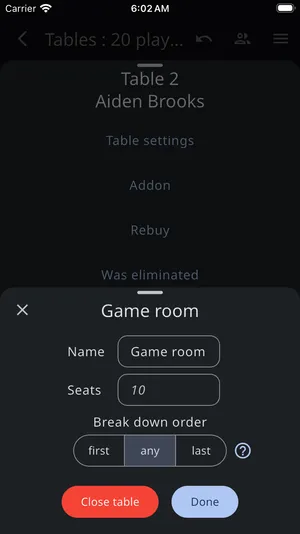
Tables can be named and the breakdown order customized
Section titled “Tables can be named and the breakdown order customized”Give each table its own name and color, and control the order tables break down in. See Managing tables.
Features
Section titled “Features”- Creates high quality blind structures for tournaments of any size.
- Blind levels can also be created manually with complete flexibility.
- Create a new tournament by copying the settings of an existing one — structure, chips, timing, payouts, and more, without the players or log.
- Supports entry of chip sets with customizable values and colors, and ability to import your own chip images.
- Suggests a starting stack for each player from your chip values, and — once you’ve entered how many chips you own — tells you what’s left in the bank and whether it covers the expected rebuys.
- Reminds you which chips to color up at each break, or at every level in a game without them, drawn as your own chips, and quietly drops a denomination from the timer once the blinds have outgrown it.
- Supports big blind antes, standard antes, or no antes.
- Includes a full screen timer that maximizes the size of the timer and blind values, and shows upcoming blinds and breaks, the average stack size per player, and estimated tournament end time — and can be rearranged cell by cell to show just the information you want, with a gallery of ready-made widgets to drop in.
- Customizable alerts that play sounds or spoken announcements when conditions you define are met.
- A small, safe scripting language runs through the whole app — timer text, alert conditions, payout structures, and league points formulas — so a payout can add places as the field grows, or an alert can fire at exactly the moment three players remain.
- A QR code can be added to the timer screen so anyone can follow a live view of it on their own device, without being able to edit it.
- Players connected through a shared tournament can update their own profile — photo, name, and contact details — and report their current chips and hand, which flow to the organizer’s log and a Chip leaders timer widget. See Player profile updates.
- Supports player and table management:
- Add players to your tournament, import them from another tournament, or add a whole Player Directory group at once.
- A flexible seating algorithm: seat a group with Random order and Balance tables and the app spreads them across tables where it can, and avoids putting them in adjacent seats when it can’t.
- A table view that shows all tables with the players and open seats at each table, and allows players to be drag-dropped between seats at a table or between tables.
- Warns when tables are out of balance or can be consolidated, and helps with resolving each situation. Keeps track of how many times each player has been used for balancing tables and warns if they are picked again.
- Supports bounty chips, tracking who bought one, who holds whose bounty, and each player’s bounty winnings — kept separate from the prize pool. A Bounties timer widget shows the top bounty winners, and Stats includes a total winnings column that combines payouts and bounty money.
- Keeps a detailed log of player buy-ins, addons, rebuys, reentries, knockouts, breaks, blinds, timer pauses and resumes, and the total play time for each player.
- Tracks the tournament’s high hand — with an optional High hand timer widget — and lets you record player hands and chip counts right in the log with card pickers, plus a Hand evaluator in the main menu that ranks any Hold’em or Omaha hand and shows its win probability.
- A hand timer — a shot clock you can start from the main menu while the tournament clock is running, with a configurable number of seconds.
- A Stats screen that shows each player’s place, payout, points, chips cost, chips bought, play time, players eliminated, and more — with the ability to choose which columns are shown and drag to reorder them. And supports exporting the shown columns as a CSV file for use in Excel or another spreadsheet app.
- A Club stats dashboard that compiles a whole season of completed tournaments in a folder into leaderboards, points charts, and money and attendance stats.
- A payouts screen for calculating and customizing payout percentages and amounts, with support for ICM, chip, even, and custom chops.
- A Replay screen to visualize the entire tournament as players are seated, tables are balanced and consolidated, showing every step to the tournament to conclusion.
- A Simulate feature that instantly finishes a tournament with realistic hands, knockouts, and payouts — or generates a whole season of sample tournaments to explore Club stats.
- Organize tournaments into folders, and recover anything you delete from the Trash.
- An account feature to securely back up your tournaments to the cloud and share them between devices, with real-time syncing of changes.
- Share control of your tournaments by giving players a role — a Table Captain who works buy-ins, knockouts, and seating from their own device, or a Director with full control.