Coming from the old app
Poker Club HQ is the new version of the Texas Holdem Poker Timer app for iPhone and iPad, so it arrived as an update to it rather than as a separate download. Your tournaments came with you, and so did anything you bought.
This page covers what happened during that update, and how to reach back into the old app later if something is missing.
What came across automatically
Section titled “What came across automatically”The first time you opened Poker Club HQ after the update, it found every tournament the old app had stored and imported all of them onto your home screen. Nothing was left behind and nothing was converted by hand.
Each tournament came across whole: its blind levels, its players, its event log, and the timer screen you had designed, including your fonts, colors, background, and layout.
Importing a tournament later
Section titled “Importing a tournament later”If a tournament is missing, or you deleted one by mistake, you can pull it back out of the old app whenever you like.
- On the home screen, tap + in the top right.
- Choose Import from the old app.
- Pick a tournament from the list. Each row shows its name and when the old app last saved it.
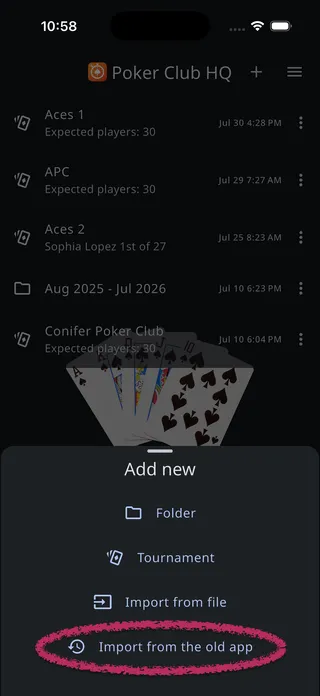
It arrives as a new tournament on your home screen, exactly as the automatic import would have delivered it.
Your old tournaments are never gone
Section titled “Your old tournaments are never gone”Importing does not move or consume anything. The old app’s files stay on the device permanently, so:
- You can import the same tournament as many times as you want.
- Deleting a tournament in Poker Club HQ never touches the old app’s copy.
- There is no way to use the list up, and nothing you can break by experimenting.
Each import creates a separate new tournament, so importing the same one twice gives you two copies. If that happens, just move the extra one to the trash.
Which devices this works on
Section titled “Which devices this works on”The old app existed only on iPhone and iPad, so importing from it is available only there. Android and the web have nothing to import from, and the menu item never appears on them.
Even on an iPhone or iPad, the menu item appears only on a device where Poker Club HQ replaced the old app in place. Two situations leave you without it:
- You deleted the old app before installing Poker Club HQ. The two share the same storage, so removing the old app erased its files along with it. There is nothing left on the device to import.
- This is a different or newer device. A phone that never ran the old app has none of its files, even if you are signed in to the same account.
In both cases your tournaments can still reach the new device through your account. Sign in on the device that has them, let them sync, then sign in on the other one. See Cloud sync & accounts.
If someone sends you a tournament file from the old app (a .ptt file), you can tap it wherever it arrives on an iPhone or iPad and it opens straight into Poker Club HQ. See Opening a file someone sent you.
Your purchases
Section titled “Your purchases”Anything you bought in the old app (Advanced Player and Table Management, Customization, Remote Control, or The Works) is still yours, and the features it unlocked stay unlocked at no charge. Poker Club HQ recognizes those purchases on its own, without you tapping anything.
Poker Timer Pro was a separate app, so its purchase works a little differently and takes one extra step.
Both cases are covered in full on Purchases & plans.
What replaced Remote Control
Section titled “What replaced Remote Control”The old app’s Remote Control, where two devices typed the same Share ID and password, has been replaced by QR code sharing and by roles for co-hosts. Both do the same job with less setup.
See QR code sharing and Roles & shared control.