Stats & reporting
The Stats screen presents a sortable data table summarizing every player’s tournament performance.
Stats on this page cover a single tournament — for a leaderboard across a whole season of tournaments in a folder, see Club stats.
Data columns
Section titled “Data columns”The table includes the following columns:
| Column | Description |
|---|---|
| Name | Player’s display name |
| Place | Finishing position (1st, 2nd, etc.) |
| Payout | Prize amount based on placement and payout structure |
| Points | Custom-calculated value using your scoring formula |
| Chips cost | Total amount paid for all buy-ins, addons, and rebuys |
| Chips bought | Total chip count the player received |
| Play time | Time seated at a table, not counting breaks or timer pauses |
| Eliminated | Number of players this player knocked out — a fraction when several players split a pot that busted someone |
| Players eliminated | Names of players this player knocked out |
| Eliminated by | Names of players who knocked this player out |
| Bounty held | Current bounty chip value |
| Bounty cost | Amount paid for bounty chips, tracked separately from Chips cost (bounty money does not enter the prize pool — see Bounties) |
| Bounty winnings | Earnings from collecting bounties |
| Total winnings | Payout plus bounty winnings, plus the value of a bounty chip the player still holds |
The three bounty columns and Total winnings exist only in tournaments with bounty chips enabled.
Choosing columns
Section titled “Choosing columns”Tap the column button in the top bar to open the Choose columns sheet. Check or uncheck a column to show or hide it, and drag the handle on a visible column to reorder it. At least one column must stay visible, and Reset restores the default set and order.
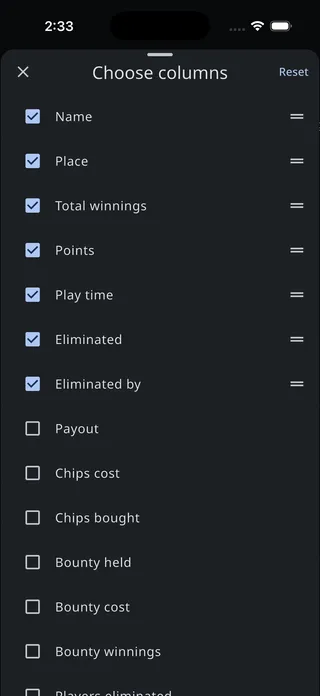
Your choice is saved with the tournament — it syncs across devices — and the CSV export follows it.
Sorting
Section titled “Sorting”Tap any column header to sort the table by that column. Tap again to toggle between ascending and descending order. Your sorting preference is saved to the device.
Points formula
Section titled “Points formula”The Points column uses a customizable scoring formula. Tap the calculator icon next to the “Points” column header to open the Player points formula editor. This is how poker leagues award points on their own terms — factoring in finishing place, number of entrants, knockouts, or anything else the tournament knows.
The editor gives you:
- Script — An EZScript expression that calculates a player’s points. The built-in formula curves the award logarithmically by finishing place, and splits a tie across the places it spans the way payouts do. The simplest alternative,
totalPlayerCount - playerId.toPlayer().place + 1, just pays last place 1 point and each place above it one more. - Live preview — The points the formula produces for the top 5 finishers, updating as you type. Until somebody has been knocked out there are no finishers to preview, and the panel says so.
- Script explorer — The
{ }icon in the app bar, listing every value you can reference. - Reset to defaults — Appears once your formula differs from the built-in one.
The formula is evaluated once per player, with playerId set to that player — playerId.toPlayer() gets you their place, knockouts, and payout. See Scripting for the language, Tournament data for what you can reference, and Examples for formulas to copy.
The same formula is what Club stats sums across a season, and what the Points widget puts on the timer screen when a tournament ends. Set it once and all three agree.
CSV export
Section titled “CSV export”Export the stats table in two ways:
- Export CSV (share icon) — Opens the device’s native share sheet so you can email the CSV, send it via messaging, or save it to cloud storage
- Download CSV (download icon) — Saves the CSV file directly to your device
Either button appears only where the platform supports it. The exported file is standard CSV containing all players and your chosen columns in your chosen order, with durations written in a form spreadsheets understand.