Scripting overview
Several parts of Poker Club HQ let you write a small piece of code instead of picking from a fixed list of options. That’s how a payout structure can grow more places as the field grows, how an alert can fire at exactly the right moment, and how the timer screen can show your league’s own scoring.
The language is called EZScript. It’s deliberately small — closer to a spreadsheet formula than a programming language — and it’s sandboxed: a script can read your tournament, but it can’t change it, reach the network, or slow the app down.
You don’t need to learn it to use the app. Every default works out of the box, and the built-in examples are there to copy.
Where scripts are used
Section titled “Where scripts are used”There are seven places, and they come in two flavors.
| Where to find it | What you write | Must produce |
|---|---|---|
| Content → Value | Template | Text |
| Content → Condition | Expression | True or false |
| Layout & content → row or column → Condition | Expression | True or false |
| Alerts → Condition | Expression | True or false |
| Alerts → TTS text | Template | Text to speak |
| Payouts → Script | Script | A list of amounts |
| Stats → Player points formula | Script | A number |
Expressions
Section titled “Expressions”An expression is a single question with a yes-or-no answer. You write it bare, with no braces:
totalChipsInPlay > 0currentLevel.ante > 0 && currentLevel.bigBlind == 0Conditions decide whether something appears or fires. Nothing else.
Templates
Section titled “Templates”A template is ordinary text with expressions embedded in double curly braces. Text outside the braces is used exactly as written; each {{ … }} is replaced by its result:
Chips in play {{ totalChipsInPlay }}Level {{ blindLevelNumber }} of {{ blindLevelCount }}The tournament starts in about {{ round(secondsLeftInLevel/60) }} minutes.A template can have as many braces as you like, or none at all.
Scripts
Section titled “Scripts”The payout and points editors take a script — several lines that end in a result. Intermediate values get names along the way, and the last line is what counts:
places = 1 + totalBuyIns / 5defaultPayoutPercentages(places).map(func(p) { p * netPrize })The editor
Section titled “The editor”All seven fields share one editor, so learning it once is enough.
- Syntax highlighting colors names, numbers, strings, and keywords, which makes an unclosed quote or brace obvious at a glance.
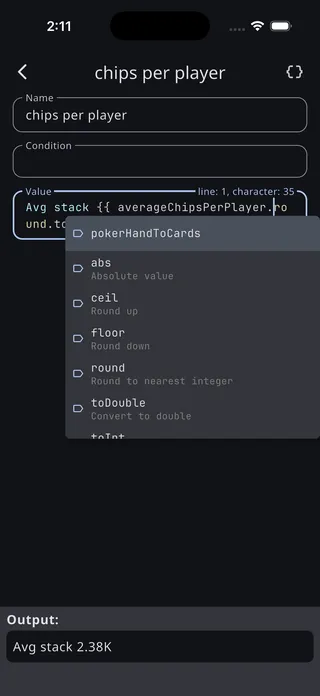
- Autocomplete offers matching values as you type, each with a description. In template fields it only fires inside
{{ }}, where it’s useful. - Live results appear under the field and update as you type — the rendered text, the resolved payouts, the points for your top five finishers. This is the fastest way to know a script does what you meant.
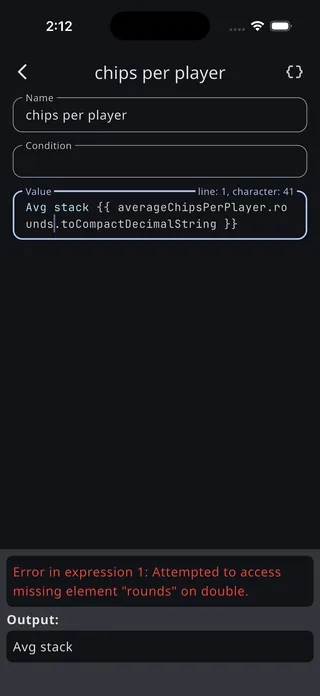
- Errors appear in red rather than silently failing, and name the problem.
The Script explorer
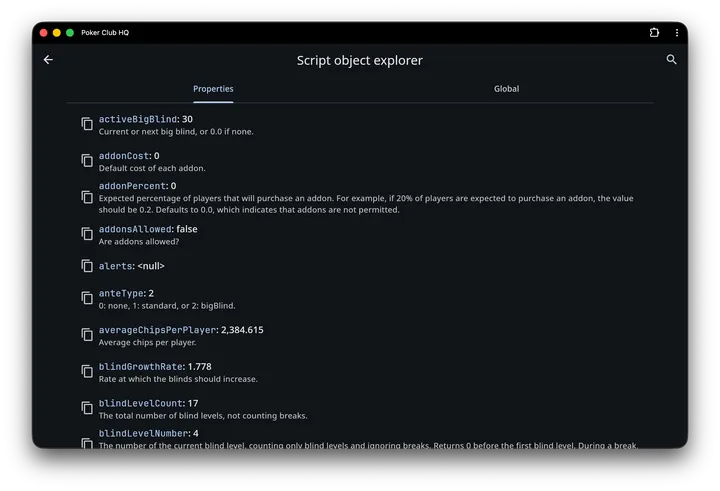
Section titled “The Script explorer”The { } icon in the app bar opens the Script object explorer, which has two tabs:
- Properties — everything about this tournament the current field can reference, each with a description and its value right now. You can drill into objects — a player, a level, a table — to see what they contain.
- Global — the language’s own built-in functions and constants.
Search the list from the app bar, and tap the copy icon beside any name to put it on the clipboard.
It’s the best answer to “what’s that value called again?”, and it’s tailored to the field you opened it from — the payouts explorer, for instance, doesn’t list values a payout script isn’t allowed to use.
When a script goes wrong
Section titled “When a script goes wrong”A broken script never breaks your tournament. What happens depends on where it is:
| Where | What happens |
|---|---|
| Content Condition | Treated as false, so the cell hides |
| Content Value | The failing {{ … }} becomes empty; if nothing is left, the cell draws nothing |
| Row/column Condition | Treated as false, so the block hides |
| Alert Condition | The alert doesn’t fire |
| Payouts script | Payouts silently fall back to the percentages, and the Payouts screen shows a warning |
| Player points formula | That player scores 0 |
Inside edit mode a cell that produces nothing still holds its place — with a striped label bar, and a preview of its raw text — so a silently empty cell is easy to find. To see why it’s empty, open the cell’s content or condition: the editor evaluates as you type and reports the error in red.
Limits
Section titled “Limits”Scripts are capped so a mistake can’t freeze the timer:
- Each script gets about 10 milliseconds to run; alert conditions, which are checked every second for every alert, get a tighter budget still.
- Functions can call themselves up to 500 levels deep.
A script that exceeds either limit stops with an error and is treated as failed. In practice you’d have to write a runaway loop to hit them — every built-in script in the app finishes in a fraction of the budget.
Where next
Section titled “Where next”- Language reference — the syntax, and the built-in functions and formatters
- Tournament data — every value you can read, and what’s in a player, table, level, or log entry
- Examples — real scripts from the app, explained
- Scripts with AI: getting an AI assistant to write scripts for you